The <path> element in SVG
The <path> element is the most
flexible of the drawing
primitives in SVG. It is so flexible, that technically speaking, one
would not need any of the others! Why have the others then? we might
ask. Well it is easier for we humans to specify a circle than to use
the particular subcommand of <path>
that would accomplish
the same result.
Since <path> is so powerful and flexible, that means it
also has a bit more complexity and is, accordingly, a bit trickier to
learn.
Like the other drawing primitives such as <rect>
and <ellipse>, <path> can take
attributes like fill, stroke, and dash array. On the other
hand it uses a special syntax for describing the way it actually visits
points in the plane. It borrows some of its origin (at least idealogically) from turtle
graphics (used in the Logo programming language to help
introduced younger children to the basics of computer programming).
That is, we move the pen (or drawing point) from position to position,
raise it and lower it, and make strokes of varying types. These
instructions within the path syntax are considered to be the
"subcommands" of the path object and are to be found in its d
attribute.
We see from the Primer's treatment of the subject, that a path
typically begins with the M subcommand instructing the drawing to begin at a specific (x,y) point such as the point (100,100):
d = "M 100,100 ...
From there, we continue adding points, that is, (x,y) pairs, describing lines segments to be joined along the path.
Let us begin with the case study of drawing a shape resembling the letter 'M.' Basically, we just follow the sequence of coordinates from left to right, connecting them as we go.
Now, let's play with the pen up and pen down command
just a bit. This gives us a way of composing complex shapes that might,
even, for example, have holes in them that allow things underneath to
remain visible.
Finally, though there is more to be gleaned from
both the SVG specification and the SVG primer, we'll work a bit
with Bézier curves.
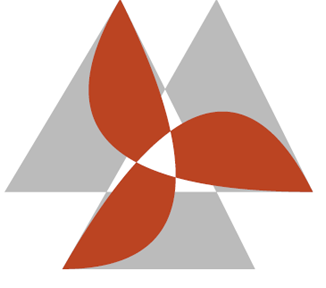
Note how the example from the Primer involving this code:
<path fill="#bbb" fill-rule="evenodd"
d="M 70 140 L 150,0 200,100 L 40,100 100,0 L 170,140 70 140"/>
<path fill="#b42" fill-rule="evenodd"
d="M 70 140 Q 150,0 200,100 Q 40,100 100,0 Q 170,140 70 140"/>
produces a shape like this
Observe
that the angles of the reddish shape at which the curves actually meet
are sharp rather than rounded. Let's see if we can use what we've read
in the Primer about Bezier curves to make something like the above
shape only smooth rather than sharp! If you're familiar with a trefoil knot, then that is the sort of shape we'll be aiming toward.
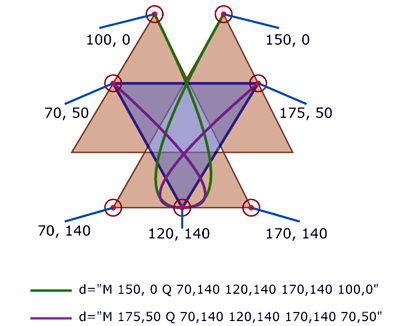
First
we may observe that if the desired shape were to pass through any of
the six points of the linear path, H, on six points, then in order for
the parts of the curve that meet there to be smooth and for any of them
to be tangent to lines of H, then the new curve would have to extend
beyond the bounds of X. We could extend the lines of X into a larger
equilateral triangle and then work on building our trefoil knot. This
could be done with cubic Bezier curves by defining a curve that passes through the same three endpoints
it already does but to be "guided" by the control points consisting of
the three points of the circumscribed triangle, shown below as the
light green line.
<path fill="#c53" fill-rule="evenodd" opacity=".5"
d="M 70 140 C 17.5 ,140 150,0 200,100 C 220, 140 40,100 100,0  C 127,-47 170,140 70 140"/>
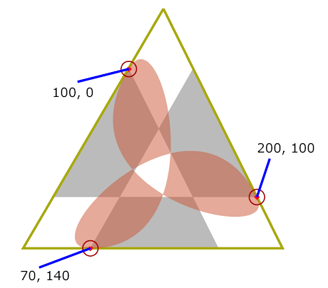
Another
approach, that would be more symmetric, would be to form a triangle
from the three midpoints of the outermost edges of the six sided
polygon H, and to let the curve pass through those three points with
the control points of the cubic curves being the six original points of
H.
Here
we see that by defining those three midpoints {(), (), and ()}and
allowing the original points of H to act as control points, we can
define a variety of cuves that move through the midpoints and which are
tangent to the curve at those points.
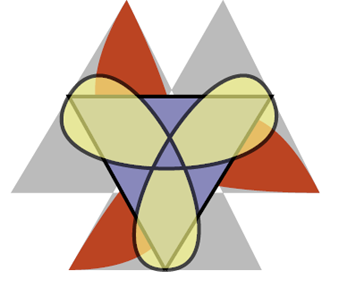
Another solution is similarly given by
 <path fill="#ff8" fill-rule="evenodd" stroke="black" stroke-width="2" opacity=".65"
d="M 120 140 C 70 140 150,0 175, 50 C 200,100 40,100 70, 50 C 100,0  170,140 120,140"/>
as shown below and at this address:
.