With
slight modifications to the 'M' shape developed earlier, we may make
two of them next to each other by simply moving all the x coordinates
to the right:
<path d="M 100,350 100,100 200,225 300,100 300,350" fill="none" stroke="black" stroke-width="30"/>
<path d="M 400,350 400,100 500,225 600,100 600,350" fill="none" stroke="black" stroke-width="30"/>
Now let us introduce a slight variation by using a second 'pen-down' command :
<path d="M 100,350 100,100 200,225 300,100 300,350" fill="none" stroke="black" stroke-width="30"/>
<path d="M 400,350 400,100 500,225 M 600,100 600,350" fill="none" stroke="black" stroke-width="30"/>
Note
that the stroke between the third and fourth coordinate pairs is
discontinued but resumed, again, between the fourth and fifth pairs.

Now, let's do one more experiment with the pen-up and pen-down to make more complex shapes with <path>.
Following
are two paths drawn with one apparently "inside" the other (in the
sense that the coordinates of one are contained inside the polygon
defined by the other):
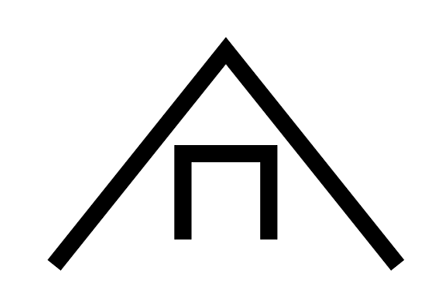
<path d="M 100,350 300,100 500,350" fill="none" stroke="black" stroke-width="20"/>
<path d="M 250,320 250,220 350,220 350,320" fill="none" stroke="black" stroke-width="20"/>
Note how the rectangle (which could also be drawn as a <rect>) is encompassed by the triangle.:
Next,
note that by adding the simple 'z' subcommand (shown below in red) at
the end of each of the strings, the paths are closed rather than left
open between endpoints.
<path d="M 100,350 300,100 500,350 z" fill="none" stroke="black" stroke-width="20"/>
<path d="M 250,320 250,220 350,220 350,320 z" fill="none" stroke="black" stroke-width="20"/>
appearance:
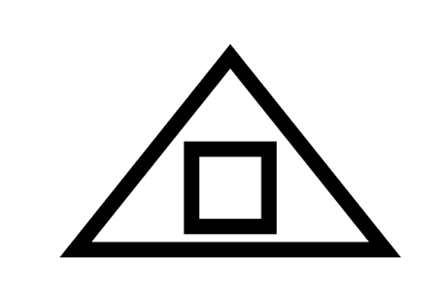
Observe that the above appearance can alternatively be accomplished with a
single path object as follows:
<path d="M 100,350 300,100 500,350 z
M 250,320 250,220 350,220 350,320 z"
fill="none" stroke="black" stroke-width="20"/>
This
can save a bit on markup, with the possible problem of increased
cognitive complexity and decreased semantic accessibility of the
resultant object. However, there are some additional benefits to this
approach that are worth considering.
By combining the two shapes
above into one complex path, the fill-rule of that path may be defined
as "even-odd." The net effect of this is that whatever color is used as
the fill of the shape will not be applied to the interior region
(though it would be to regions inside the interior region).
<path d="M 100,350 300,100 500,350 z
M 250,320 250,220 350,220 350,320 z"
fill="#ff8" stroke="black" stroke-width="15" fill-rule="evenodd"/>
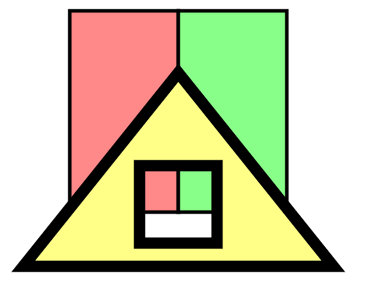
The advantage here can be seen in this example,
in which rectangles which underly the triangle may be seen through the
rectangular hole in the shape. This effect would be difficult to
produce if the two parts of this compound path were viewed as separate
paths, since in order to be visible the rectangle would have to be atop
the triangle, but in that case nothing inside it, other than the
triangle itself would be visible.