 Mechanics for the simple use of images in HTML
 Mechanics for the simple use of images in HTML
The simplest form:
<IMG SRC="yourfilename"> in which filename is either an absolute or relative address on the Internet or on your machine,
two examples:
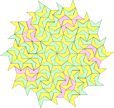
1. <IMG SRC="tile5b.gif"> (which points to an address relative to the location of this page and displays the following image)
-- specifically, in this case,
a. start at the directory which contains the current page:
http://srufaculty.sru.edu/david.dailey/javascript/html
b. find a file in that directory named 'tile5b.gif'.
2. <IMG SRC="http://srufaculty.sru.edu/david.dailey/machine.gif"> (which points to an absolute address or URL of an image)
The following uses "alt" to display text where the image would be -- recommended for browsers without graphics (e.g., lynx in UNIX), browsers in which the graphics have been turned off, and for readers who are vision-impaired.
<IMG SRC="tile5b.gif" ALT="tiling pattern by dpd">
Playing with sizing
<IMG SRC="tile5b.gif" WIDTH="72" HEIGHT="108" ALT="tiling pattern by dpd">
Making an image part of a link:
<A HREF="../../tiles/tile5.gif"><IMG SRC="tile5b.gif" ALIGN="MIDDLE"></A>click on the picture to see an expanded version
More on relative addresses:
In the preceding example, the relative address "../../tiles/tile5.gif" instructs the browser to
1. start with the current directory -- in this case http://srufaculty.sru.edu/david.dailey/javascript/html --
2. go up one level, to http://srufaculty.sru.edu/david.dailey/javascript;
3. then go up another level to http://srufaculty.sru.edu/david.dailey/;
4. then find a subdirectory of that named "tiles", specifically http://srufaculty.sru.edu/david.dailey/tiles;
5. then find a file in that directory named "tile5.gif", specifically, http://srufaculty.sru.edu/david.dailey/tiles/tile5.gif .)
Note: See copyright notice concerning images used on this page. The fire-engine is derived from a public domain work published in Webster's New International Dictionary of the English Language, 1911, G & C Miriam Co. Springfield, MA.