Postscript on seashell.
The previous case study discussed various ways of combining blurred and sharpened versions of the image. Because the image in question is an engraving, with the engraver's oversharp lines having been used to simulate grey (due to the limitations of the printing process in 1911), our preservation of those lines may have more historical than artistic value.
Accordingly we might be interested in blurring those lines in hopes of recreating the shades of grey the engraver had approximated. The Gaussian blur (at radius 2.5) show in the figure succeeds in eliminating those lines, with a result as desired, but with the unfortunate side-effect that the edges (outlines) of the shell have been blurred as well. One way to overcome this limitation is to apply the blur only to the interior of the image.
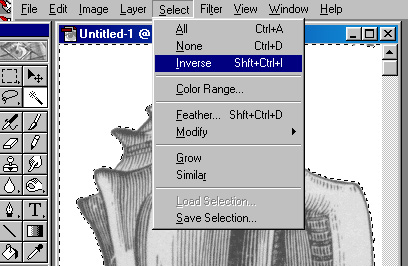
1. Select the white space surrounding the conch, using the magic wand, and then invert the selection:
The result should be a selection consisting just of the conch. (Why do it this way rather than using the magic wand directly on the conch?)
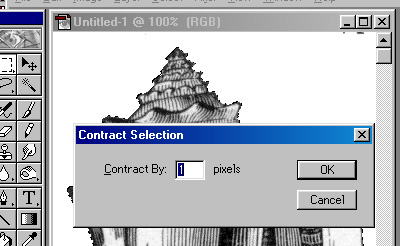
2. Shrink the selection inward a bit (say 1 pixel) [Select/Modify/Contract]. This is so that the edge of the object will not be a part of the selection. Copy the selction to the clipboard, in case we'd like to use it again [hint: we will].
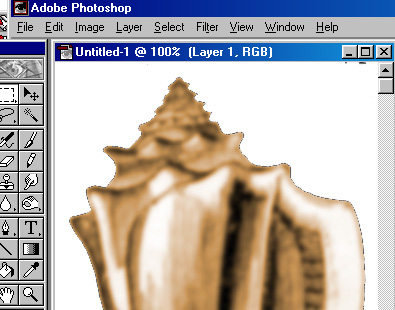
3. Then apply the Gaussian blur [Filters/blur/Gaussian blur] to the interior portion of the conch and false colorize [Image/Adjust/Hue_Saturation].
4. With the selection still active, paste the clipboard (with the grey and sharpened version) into the region [Edit/Paste_Into], and play with the type and opacity of paste:
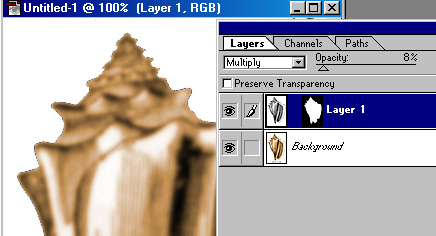
5. The resulting image (once resized) may be suitable for corporate consumption:

* Note: I am seeking permission for use of Adobe® trademarks, screen shots, and the like as contained in various statements by that corporate entity (e.g. http://www.adobe.com/misc/pdfs/USGenExtTMdb022803.pdf, http://www.adobe.com/misc/permissions.html, http://www.adobe.com/misc/agreement.html, and http://www.adobe.com/misc/trademarks.html ) though the reader might wish to be aware that such permission statements do exist before replicating any marks associated with software companies.