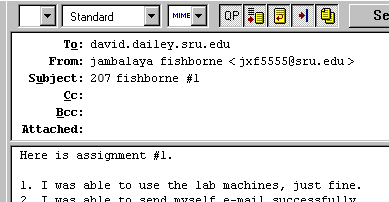
Proper format of subject-line for class-related e-mail
CpSc 207
Shell Commands and Scripting
Week 1
Course introduction.
The syllabus (discussed in class). Statements on academic honesty, cheating, etc.
A "home page" for the class (srufaculty.sru.edu/david.dailey/cs207/index.htm).
Discussion of "accounts": Windows, e-mail, and Linux/UNIX.
New: the basic commands in UNIX.
Reading assignments: Familiarize yourself with the class home page, with class-related resources, the syllabus, and, in particular the weekly web notes.
Typical assignments: Some assignments will require the use of email, while others will require submission of printed material. If an assignment should require email, UNIX commands and output may be copied into the body of an email message. For turning in most assignments, these instructions must be followed.
This week's lecture topics:
Logging into UNIX
General systems terminology:"Operating systems", "Applications", "Documents", "Content"
Overview of hardware
The desktop: windows, scrolling, GUI
Web browsing: A bit of history of the web: ARPANet, Internet, gopher, www, URL, clients and servers. html, http, ssh, telnet and ftp.
Copying and Pasting between applications. CTRL-C and CTRL-V (also in putty.exe, demonstration to be done in class).
E-mail: reading, sending, forwarding, replying, attachments.
Under no circumstances should you email me attachments.
Required format of class-related e-mail.
Your
e-mail to me should contain, in the SUBJECT LINE the course number: "207"
followed by your last name and the assignment number.
Proper format of subject-line for class-related e-mail
Proper: 207 fishborne #1
Improper: Cpsc207 fishborne #1
Failure to submit e-mail in this form may result in a zero for that particular assignment.
Assignment 1: Due dates: Friday January 26 and Friday February 2.
By Friday January 26: Log in to and log out of your Windows account. Log in to your Linux account. Use a web-browser to find the class home page. Follow all relevant instructions from notes and reading assignments. Make sure you are comfortable with the use of e-mail. Note: it is your responsibility to make sure Windows, UNIX and e-mail are all working for you.
a) If your Linux account does not seem to exist, then have another student verify that a directory with your name doesn't exist by asking them to type (from their account) the command
ls -d yourusername
If the username exists (for example if your username were jpz1017), then the result will look like this:
$ls -d /home/SRUNET/jpz1017
/home/SRUNET/jpz1017
If your username does not exist (most likely from having added the course someone later than others) then the result will look like this:
$ls -d /home/SRUNET/jpz1017
ls: cannot access /home/SRUNET/abc1234: No such file or directory
a) If it appears that your account doesn't exist, because when you try to log in you are unsuccessful then do the following:
In
this case, your assignment is to email me (with subject line, as
specified above) and the words "No account" added in, following the
assignment number, so that I may request that your account be created.
The subject line will, therefore, look like "207 YOURLASTNAME #1
No account." Include in the body of the email the account name of the
student who verified for you that the account does not exist. Within
two business days after your email to me, your account should be
created, whence the second part of the assignment may be undertaken.
or b)
If you are able to login to your Linux account, then there is no need
to send me email on or before January 26th. You may proceed to the
second part of the assignment:
By Friday February 2: